Supabase and Stripe: The Ultimate SaaS Payment Stack
Discover how Supabase and Stripe create a seamless SaaS payment architecture. Learn to manage user data securely and handle payments efficiently, scaling from one customer to millions.

Zakariae

Building a successful SaaS platform requires two fundamental capabilities: managing user data securely and processing payments reliably. For years, developers cobbled together disparate systems, wrestling with authentication flows, database schemas, and payment gateway integrations that never quite worked together seamlessly. The modern approach combines Supabase for backend infrastructure with Stripe for payment processing, creating a powerful stack that has become the de facto standard for SaaS development in 2024 and beyond.
This architectural pairing addresses the core challenges that every subscription business faces. Supabase handles user authentication, real-time data synchronization, and PostgreSQL database management, while Stripe manages the complex world of recurring payments, subscription lifecycle events, and global payment compliance. Together, they form a foundation that can scale from your first customer to millions of users without requiring a complete infrastructure overhaul.
Whether you are building a multi-tenant boilerplate for client applications, launching a content subscription service, or creating the next great productivity tool, understanding how these two platforms work together will dramatically accelerate your development timeline and reduce the technical debt that often accumulates in early-stage products.
Key Takeaways
- Supabase and Stripe together create a complete SaaS backend, handling everything from user authentication to subscription billing without requiring custom server infrastructure.
- Edge functions serve as the secure bridge between your frontend and Stripe, ensuring sensitive payment operations never expose API keys to client-side code.
- Webhook synchronization is critical for maintaining data consistency between Stripe subscription states and your Supabase user records.
- Row Level Security (RLS) policies in Supabase can be tied directly to subscription status, enabling feature gating at the database level.
- The stack supports rapid iteration, allowing you to launch an MVP in days rather than months while maintaining production-grade security.
- Self-hosting options exist for both platforms, giving you control over costs and data sovereignty as your platform scales.
Understanding the Supabase and Stripe Integration Philosophy
Before diving into implementation details, it is essential to understand why these two platforms complement each other so effectively. Supabase positions itself as an open-source Firebase alternative, providing authentication, instant APIs, real-time subscriptions, and PostgreSQL database hosting. Stripe, meanwhile, has spent over a decade perfecting the art of payment processing, handling everything from simple one-time charges to complex metered billing scenarios.
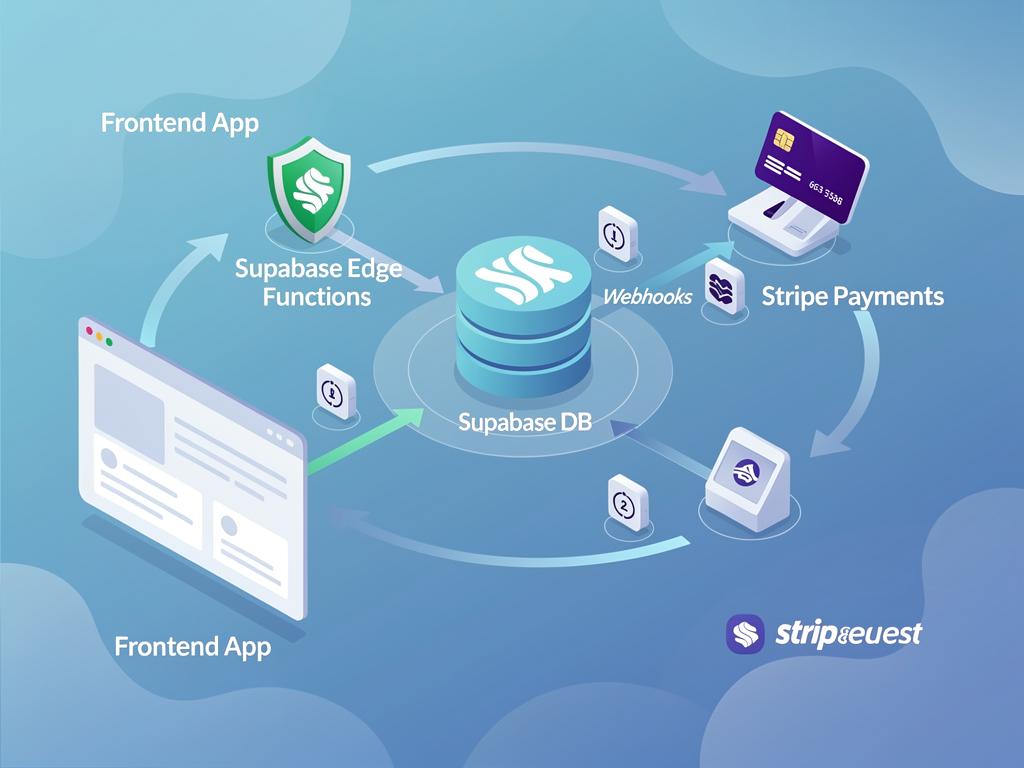
The integration philosophy centers on separation of concerns. Supabase manages your application's core data layer, including user profiles, application state, and business logic. Stripe handles the financial layer, including payment methods, invoices, subscription states, and tax calculations. The two systems communicate through webhooks and API calls, with your application serving as the orchestration layer that keeps them synchronized.
This separation provides several advantages. First, you can leverage each platform's strengths without compromise. Supabase's real-time capabilities shine for collaborative features, while Stripe's battle-tested payment infrastructure handles the complexity of global payment compliance. Second, the architecture remains flexible. If you ever need to swap out one component (perhaps moving to a different database provider or payment processor), the clean boundaries make migration feasible.
Industry reports indicate that startups using this combined stack can reduce their time-to-market by 60% compared to building custom authentication and payment systems. The Supabase documentation provides extensive guidance on authentication patterns, while Stripe's developer resources cover every conceivable billing scenario.
Setting Up Your Supabase Project for SaaS
Every successful SaaS integration begins with a properly configured Supabase project. The initial setup involves creating your project through the Supabase dashboard, configuring authentication providers, and establishing your database schema. While the process is straightforward, several decisions made at this stage will impact your application's architecture for years to come.
Start by creating a new project and noting your project URL and anon key. These credentials will be used in your frontend application to communicate with Supabase services. For production applications, you will also need the service role key, which provides elevated permissions for server-side operations. Store these credentials securely using environment variables, never committing them to version control.
Your database schema should include tables for user profiles, subscription information, and any application-specific data. A typical SaaS schema includes:
| Table Name | Purpose | Key Fields |
|---|---|---|
| profiles | Extended user information | id, email, full_name, avatar_url, created_at |
| subscriptions | Stripe subscription mirror | id, user_id, stripe_subscription_id, status, plan_id |
| customers | Stripe customer mapping | id, user_id, stripe_customer_id |
| prices | Product pricing information | id, product_id, stripe_price_id, unit_amount, interval |
| products | Available subscription tiers | id, stripe_product_id, name, description, active |
Configure Row Level Security (RLS) policies from the start. These policies ensure that users can only access their own data, even if a bug in your application logic attempts to query another user's records. For the profiles table, a basic policy might allow users to select and update only rows where the id matches their authenticated user ID.
Pro Tip: Create a database trigger that automatically creates a profile row whenever a new user signs up through Supabase Auth. This ensures your profiles table stays synchronized with the auth.users table without requiring additional application code.
Configuring Stripe for Subscription Management
Stripe configuration requires careful attention to both the dashboard setup and the product catalog structure. Begin by creating your Stripe account and completing the verification process. While you can develop using test mode indefinitely, production payments require business verification, so start this process early to avoid launch delays.
Your product catalog in Stripe should mirror your pricing strategy. Create products for each subscription tier (for example, Basic, Professional, and Enterprise), then attach prices to each product. Stripe supports multiple pricing models including flat-rate monthly subscriptions, annual billing with discounts, usage-based metering, and per-seat pricing for team plans.
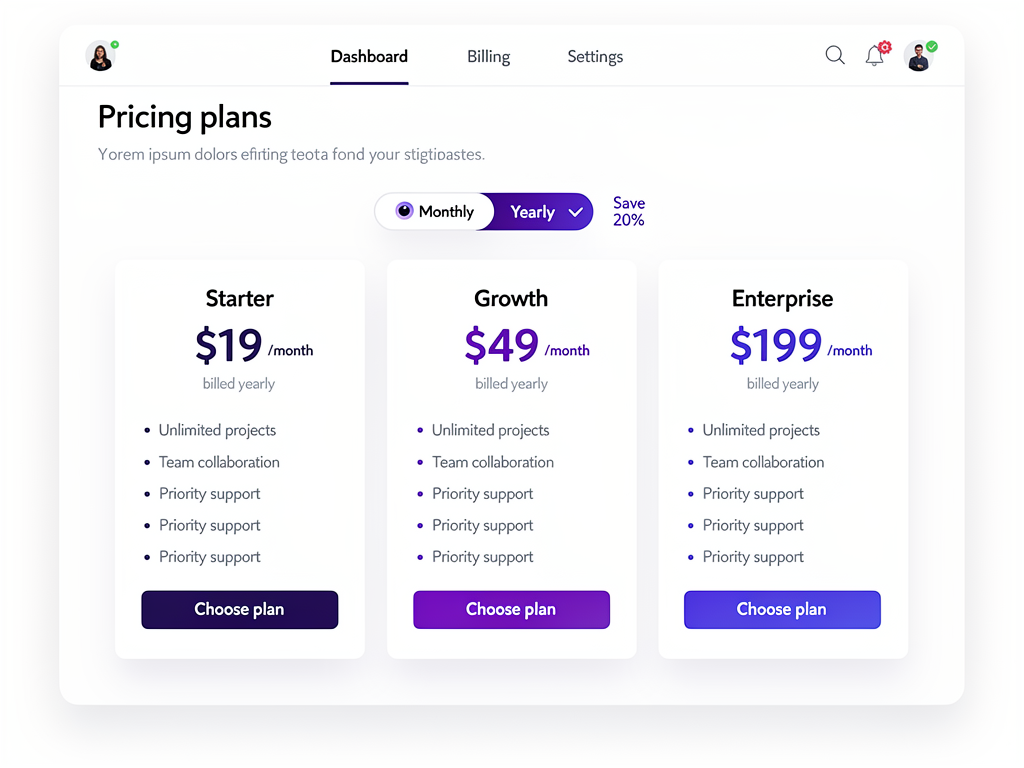
For most SaaS applications, the combination of monthly and annual pricing provides the best balance of customer flexibility and revenue predictability. Annual subscriptions typically offer a discount (commonly two months free) in exchange for upfront commitment, improving your cash flow and reducing churn.
Configure your Stripe webhook endpoints to point to your application's webhook handler. The essential events to monitor include:
- customer.subscription.created: Triggered when a new subscription begins
- customer.subscription.updated: Captures plan changes, payment method updates, and status changes
- customer.subscription.deleted: Indicates subscription cancellation
- invoice.payment_succeeded: Confirms successful recurring payments
- invoice.payment_failed: Alerts you to failed payment attempts
- customer.created: Records new customer creation in Stripe
Each webhook event should update your Supabase database to maintain synchronization between the two systems. The Stripe webhooks documentation provides detailed guidance on signature verification and event handling best practices.
Building Secure Payment Flows with Edge Functions
The connection between your frontend application and Stripe must pass through a secure server-side layer. Exposing your Stripe secret key to client-side code would allow malicious actors to charge arbitrary amounts or access sensitive customer data. Supabase Edge Functions provide the perfect solution: serverless functions that run on Deno, executing close to your users with automatic scaling.
A typical payment flow begins when a user selects a subscription plan in your application. The frontend calls a Supabase Edge Function, passing the selected price ID and any relevant metadata. The Edge Function uses your Stripe secret key (stored as an environment variable) to create either a Checkout Session or a Payment Intent, then returns the necessary client-side token to complete the payment.
Here is the conceptual flow for creating a payment intent:
- User clicks "Subscribe" on your pricing page
- Frontend sends a POST request to your Edge Function with amount, currency, and customer email
- Edge Function validates the request and creates a Payment Intent via Stripe API
- Stripe returns a client secret
- Edge Function passes the client secret back to your frontend
- Frontend uses Stripe.js to render the payment form and complete the transaction
- Stripe sends a webhook to confirm payment success
- Your webhook handler updates the Supabase database
This architecture keeps sensitive operations server-side while providing a smooth user experience. The Edge Function acts as a gatekeeper, validating requests, enforcing business rules (such as minimum amounts or allowed currencies), and logging transactions for debugging purposes.
For applications built with a Next.js boilerplate, you might alternatively use Next.js API routes or Server Actions for this secure layer. The principle remains the same: never expose your Stripe secret key to the browser.
Implementing Webhook Handlers for Data Synchronization
Webhooks form the backbone of the Supabase and Stripe integration, ensuring that subscription changes in Stripe are reflected in your application's database. Without proper webhook handling, your application might show incorrect subscription states, grant access to cancelled users, or fail to provision new subscribers.
Your webhook handler must first verify that incoming requests actually originate from Stripe. Stripe signs each webhook payload with a secret, and your handler should validate this signature before processing any events. This prevents malicious actors from sending fake webhook events to manipulate your application state.
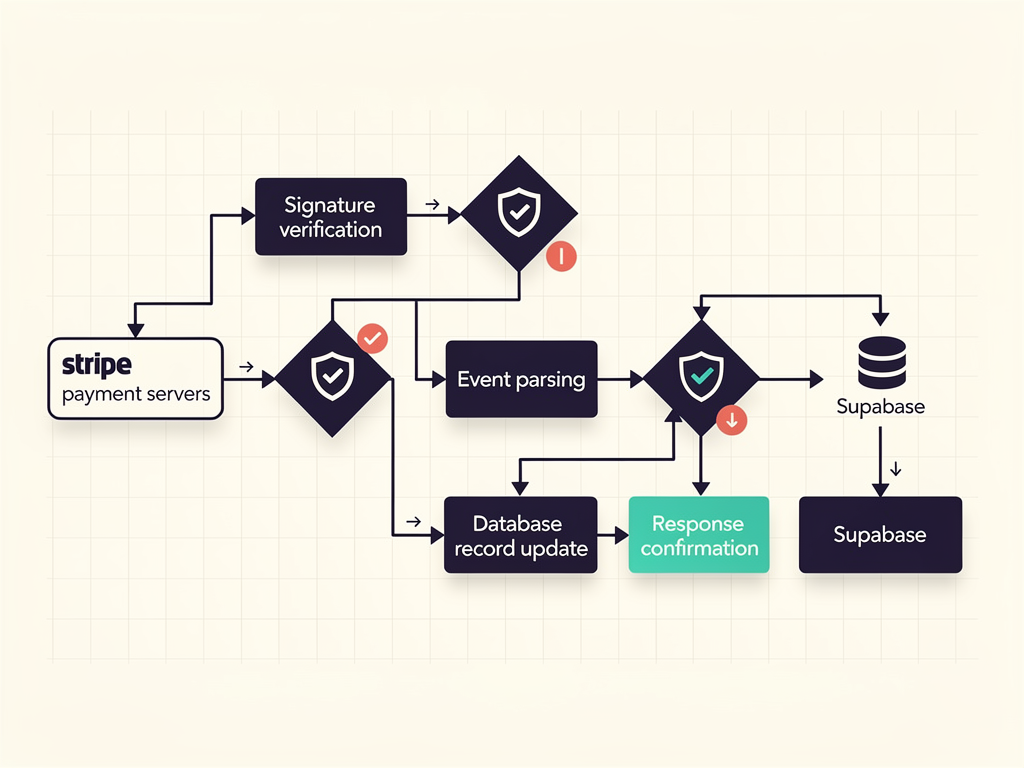
Once verified, the handler should parse the event type and payload, then update the appropriate Supabase tables. For a subscription update event, this might involve:
- Looking up the customer record by Stripe customer ID
- Finding the associated user in your profiles table
- Updating the subscription status, current period end, and plan information
- Triggering any necessary side effects (sending emails, updating feature flags)
Idempotency is crucial for webhook handlers. Stripe may send the same event multiple times (for example, if your handler returns an error or times out), so your code must handle duplicate events gracefully. Store the event ID and check for duplicates before processing, or design your database updates to be naturally idempotent.
Important: Always return a 200 status code quickly, even if background processing takes time. Stripe will retry webhooks that do not receive a timely success response, potentially causing duplicate processing issues.
For complex applications, consider using a queue system to process webhooks asynchronously. The webhook handler receives the event, validates the signature, stores the raw event in a queue table, and returns immediately. A separate worker process then handles the actual business logic, with built-in retry capabilities for failed operations.
Designing Your Database Schema for Subscription Management
A well-designed database schema makes subscription management straightforward and enables powerful features like usage tracking, team billing, and granular access control. The schema should mirror Stripe's data model while adding application-specific fields that support your business logic.
The customers table creates a link between your Supabase users and their Stripe customer records. Each user should have at most one customer record, created when they first initiate a payment flow. Store the Stripe customer ID, creation timestamp, and any billing-related preferences.
The subscriptions table tracks active and historical subscriptions. Key fields include the Stripe subscription ID, current status (active, past_due, cancelled, trialing), the associated price ID, billing cycle dates, and cancellation information. This table enables queries like "show all active subscribers" or "find users whose subscriptions expire this week."
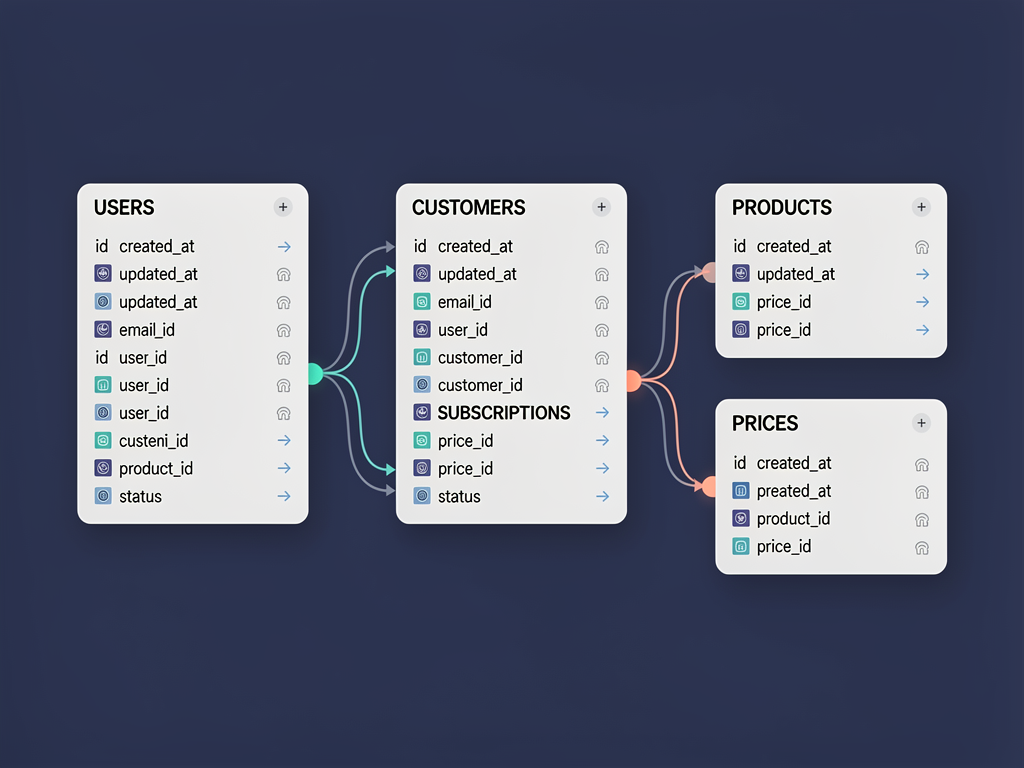
Consider adding computed columns or database views for common queries. A view that joins users, customers, and subscriptions can simplify application code by providing a single source of truth for user subscription status. PostgreSQL's materialized views can improve performance for complex queries that run frequently.
For multi-tenant applications, your schema must also handle organization-level subscriptions. This typically involves an organizations table, a memberships table linking users to organizations with role information, and subscription records tied to organizations rather than individual users. The multi-tenant platform architecture requires careful consideration of how billing responsibilities flow through your organizational hierarchy.
Implementing Feature Gating Based on Subscription Tiers
One of the most powerful aspects of integrating Supabase with Stripe is the ability to implement feature gating at the database level. Rather than checking subscription status in your application code (which can be bypassed or contain bugs), you can use Row Level Security policies that automatically restrict access based on the user's current plan.
The approach works by creating RLS policies that reference the user's subscription status. For example, a policy on a premium_features table might only allow select operations for users whose subscription status is "active" and whose plan includes premium access. This enforcement happens at the database level, making it impossible to circumvent through application bugs or API manipulation.
Implementing this pattern requires a few components:
- A function that retrieves the current user's subscription tier
- A mapping of features to required subscription tiers
- RLS policies that use these functions to control access
For simpler applications, you might store feature flags directly on the subscription record. Each plan includes a JSON column listing enabled features, and your RLS policies check whether the required feature exists in that list. This approach provides flexibility to enable features for specific customers without changing their plan.
The frontend should also reflect subscription limitations, providing a better user experience than simply returning access denied errors. Query the user's subscription status on page load and conditionally render upgrade prompts for features they cannot access. This creates natural upsell opportunities while keeping the user informed about what their current plan includes.
Handling Subscription Lifecycle Events
Subscriptions are not static. Users upgrade, downgrade, pause, cancel, and sometimes fail to pay. Your application must handle each of these lifecycle events gracefully, maintaining data consistency while providing appropriate user experiences.
When a user upgrades their subscription, Stripe handles the prorated billing automatically. Your webhook handler receives a subscription updated event with the new plan information. Update your database to reflect the new tier and immediately grant access to the upgraded features. Consider sending a welcome email highlighting what the user has unlocked.
Downgrades require more careful handling. The user should retain access to their current tier until the end of their billing period, then transition to the lower tier. Store both the current and scheduled plan in your database, and implement logic that checks which plan applies based on the current date. Stripe's subscription schedule feature can help manage these transitions.
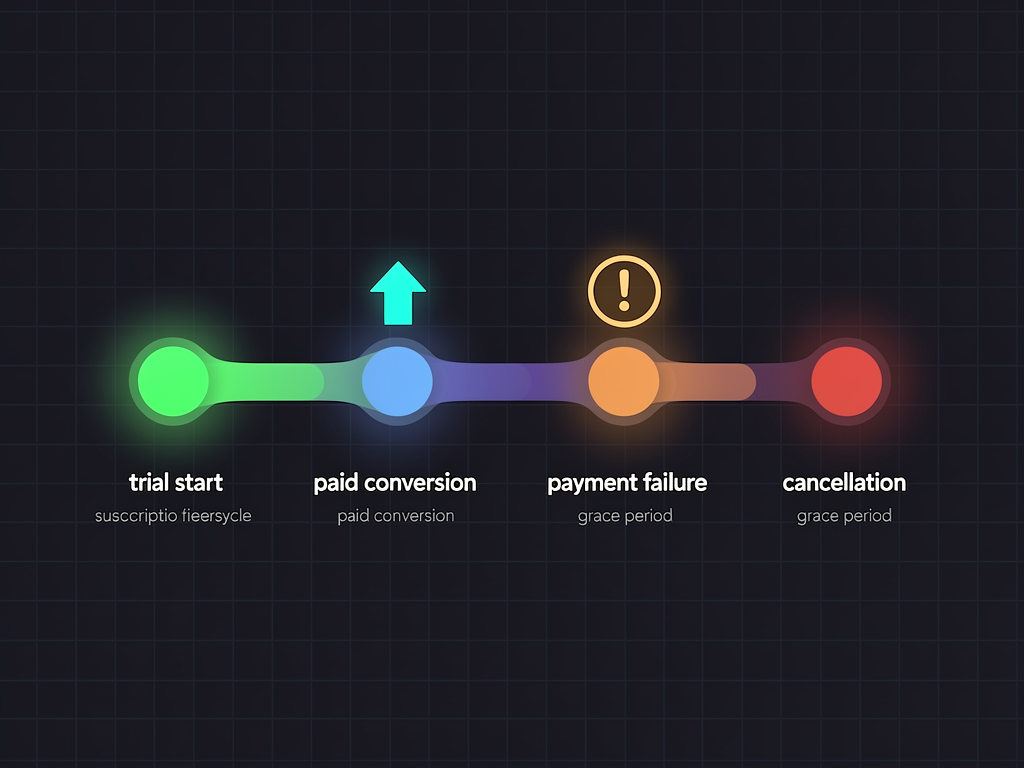
Payment failures trigger a dunning process. Stripe automatically retries failed payments according to your configured schedule, but your application should notify users and provide easy access to update their payment method. The Stripe Revenue Recovery documentation covers best practices for reducing involuntary churn through smart retry logic and customer communication.
Cancellations can be immediate or scheduled for the end of the billing period. Most SaaS applications use end-of-period cancellation, allowing users to continue accessing the service they have already paid for. Store the cancellation date and reason (if collected) for analysis. Understanding why users cancel helps improve retention over time.
Building the Customer Portal Experience
Every subscription business needs a customer portal where users can manage their billing information, view invoices, change plans, and update payment methods. Stripe provides a hosted Customer Portal that handles these functions with minimal development effort, or you can build a custom portal using Stripe's APIs.
The hosted Customer Portal is the fastest path to a functional billing management interface. Configure it through the Stripe dashboard, specifying which actions users can take (update payment method, cancel subscription, switch plans). Then create an Edge Function that generates a portal session URL and redirects the user. The entire integration can be completed in under an hour.
For applications requiring a custom-branded experience, you will need to build portal functionality using Stripe's APIs. This includes:
- Displaying current subscription details and upcoming invoice
- Listing available plans with upgrade/downgrade options
- Showing payment method on file with update capability
- Providing invoice history with download links
- Offering cancellation flow with optional feedback collection
A SaaS template that includes pre-built customer portal components can save significant development time. The portal must handle edge cases like users with multiple subscriptions, team billing scenarios, and subscription pauses. Testing these flows thoroughly before launch prevents support tickets and customer frustration.
Implementing Usage-Based Billing
While flat-rate subscriptions work for many SaaS products, some business models require usage-based billing. API platforms charge per request, storage services bill by gigabyte, and communication tools price by message or minute. The Supabase and Stripe combination supports these models through metered billing.
Usage-based billing requires tracking consumption in your Supabase database, then reporting that usage to Stripe for billing. Create a usage_records table that logs each billable event with the user ID, timestamp, quantity, and any relevant metadata. Aggregate this data periodically (hourly or daily) and send usage reports to Stripe.

Stripe's metered billing works by creating usage records against a subscription item. At the end of each billing period, Stripe calculates the total usage and generates an invoice. Your application should provide users with real-time visibility into their current usage and projected costs, helping them avoid unexpected bills.
Consider implementing usage alerts that notify users when they approach certain thresholds. A user at 80% of their included quota might appreciate a warning before incurring overage charges. These alerts improve customer satisfaction and can drive upgrades to higher tiers with larger quotas.
Hybrid models combine flat-rate subscriptions with usage-based components. A SaaS boilerplate might include a base subscription fee plus per-user charges above a certain threshold. Stripe handles these complex billing scenarios through subscription items, allowing multiple price components on a single subscription.
Security Best Practices for Payment Integration
Payment processing demands the highest security standards. A breach could expose customer payment information, result in fraudulent charges, and destroy trust in your platform. Following security best practices from the start protects your customers and your business.
Never store raw credit card numbers in your database. Stripe's tokenization system means your application never handles sensitive card data directly. The payment form renders in a Stripe-hosted iframe, and card details go directly to Stripe's servers. Your application only receives tokens that represent the payment method.
Protect your API keys with appropriate access controls. The publishable key can be exposed to frontend code (it is designed for this), but the secret key must remain server-side only. Use environment variables to inject keys at runtime, and ensure your deployment pipeline does not log or expose these values.
Security Checklist: Verify webhook signatures on every request. Use HTTPS for all API communication. Implement rate limiting on payment endpoints. Log payment events for audit purposes. Regularly rotate API keys and review access logs.
Supabase's Row Level Security adds another layer of protection. Even if an attacker gains access to your application's database connection, RLS policies prevent them from accessing other users' data. Enable RLS on all tables containing user data and test policies thoroughly to ensure they work as expected.
PCI compliance is handled largely by Stripe when you use their hosted payment forms. However, your application must still follow security best practices to maintain the integrity of the overall system. The Stripe security documentation provides guidance on maintaining a secure integration.
Testing Your Payment Integration
Thorough testing prevents embarrassing bugs and lost revenue. Stripe provides a comprehensive test mode with special card numbers that simulate various scenarios, from successful payments to specific failure conditions. Use these tools extensively before launching.
Create test cases for each payment scenario your application supports:
| Scenario | Test Card | Expected Behavior |
|---|---|---|
| Successful payment | 4242 4242 4242 4242 | Subscription created, access granted |
| Card declined | 4000 0000 0000 0002 | Error message displayed, no subscription |
| Insufficient funds | 4000 0000 0000 9995 | Specific error message, retry option |
| 3D Secure required | 4000 0027 6000 3184 | Authentication modal, then success |
| Expired card | 4000 0000 0000 0069 | Error prompting card update |

Test webhook handling by using the Stripe CLI to forward events to your local development environment. The command stripe listen --forward-to localhost:3000/webhook/stripe creates a tunnel that sends test events to your local handler. Trigger events manually or by performing actions in test mode, then verify your database updates correctly.
Automated testing should cover critical payment flows. Write integration tests that create subscriptions, simulate webhook events, and verify database state. These tests catch regressions when you modify payment-related code and provide confidence during deployments.
Scaling Your Payment Architecture
As your SaaS grows, your payment architecture must scale accordingly. The Supabase and Stripe combination handles significant scale out of the box, but certain optimizations become necessary as you process more transactions and serve more concurrent users.
Database indexing becomes critical for subscription queries. Add indexes on frequently queried columns like stripe_customer_id, user_id, and status. Monitor query performance using Supabase's built-in analytics and optimize slow queries before they impact user experience.
Webhook processing can become a bottleneck at scale. If your handler performs complex operations synchronously, webhook delivery may time out during traffic spikes. Implement asynchronous processing by storing events in a queue and processing them with background workers. This approach also improves reliability by enabling automatic retries for failed operations.
Consider caching subscription status for frequently accessed data. Rather than querying the database on every request to check if a user has an active subscription, cache this information with a reasonable TTL. Invalidate the cache when webhook events indicate subscription changes. This reduces database load and improves response times.

For enterprise-scale applications, consider Supabase's self-hosting option. Running Supabase on your own infrastructure (using platforms like Hetzner with Coolify) gives you control over resource allocation and can significantly reduce costs at scale. A Next.js SaaS template designed for self-hosting can help you get started with this approach.
Cost Optimization Strategies
Both Supabase and Stripe charge based on usage, making cost optimization important as your platform grows. Understanding the pricing models helps you make architectural decisions that balance functionality with cost efficiency.
Supabase charges based on database size, bandwidth, and Edge Function invocations. Optimize database storage by archiving old records, compressing large text fields, and avoiding unnecessary data duplication. Monitor bandwidth usage and consider implementing caching for frequently accessed data to reduce database queries.
Stripe's pricing is primarily transaction-based, with a percentage plus fixed fee per successful charge. For high-volume, low-value transactions, the fixed fee component can significantly impact margins. Consider minimum transaction amounts or bundling small purchases to improve unit economics.
Self-hosting Supabase can dramatically reduce costs for established platforms. While the managed service is excellent for development and early-stage products, running your own infrastructure becomes cost-effective at scale. The self-hosting guide for enterprise platforms demonstrates how to run production-grade infrastructure for as little as $15 per month.
Cost Tip: Annual billing for your own subscriptions (both Supabase and Stripe Atlas for incorporation) often includes significant discounts. Plan your infrastructure costs annually to take advantage of these savings.
Building Multi-Tenant Payment Systems
Multi-tenant SaaS platforms introduce additional complexity to payment architecture. Not only must you handle your own subscription billing, but you may also need to enable your tenants to accept payments from their end users. This requires careful consideration of fund flows, fee structures, and compliance requirements.
Stripe Connect provides the foundation for multi-tenant payment systems. Your platform becomes a "platform" in Stripe's terminology, and each tenant creates a "connected account." Payments from end users flow through your platform, with automatic fee splitting between your platform and the tenant.

The supabase stripe integration for multi-tenant scenarios requires additional database tables to track connected accounts and their relationships to your tenant organizations. Each tenant's connected account ID must be stored and used when processing payments on their behalf.
Consider the onboarding experience for tenants setting up payments. Stripe's hosted onboarding flow handles identity verification and bank account setup, reducing your compliance burden. Alternatively, build a custom onboarding experience using Stripe's Account API for more control over the user experience.
A Next.js starter kit designed for multi-tenant platforms should include pre-built components for tenant payment onboarding, dashboard views showing payment activity, and payout management interfaces. These features accelerate development while ensuring compliance with payment regulations.
Monitoring and Analytics for Payment Operations
Visibility into your payment operations helps identify issues quickly and optimize business performance. Both Supabase and Stripe provide analytics dashboards, but combining data from both sources gives you the complete picture.
Key metrics to monitor include:
- Monthly Recurring Revenue (MRR): Total subscription revenue normalized to monthly
- Churn Rate: Percentage of subscribers who cancel each period
- Failed Payment Rate: Percentage of payment attempts that fail
- Average Revenue Per User (ARPU): Total revenue divided by active subscribers
- Trial Conversion Rate: Percentage of trial users who become paying customers
- Upgrade/Downgrade Rates: Movement between subscription tiers
Build a metrics dashboard that pulls data from both your Supabase database and Stripe's reporting APIs. Supabase's real-time capabilities enable live updating dashboards that show subscription activity as it happens. Stripe's Sigma product provides SQL access to your payment data for complex analysis.

Set up alerts for anomalous activity. A sudden spike in failed payments might indicate a technical issue or fraud attempt. Unusual churn rates could signal product problems or competitive pressure. Automated alerts ensure you catch issues before they significantly impact revenue.
For platforms using a SaaS starter kit, look for built-in analytics features that track these metrics automatically. Pre-built dashboards save development time and ensure you are monitoring the right indicators from day one.
Conclusion
The combination of Supabase and Stripe has emerged as the standard architecture for modern SaaS payment systems. This stack provides everything you need to build, launch, and scale a subscription business: secure authentication, real-time database capabilities, robust payment processing, and comprehensive subscription management.
Success with this architecture requires attention to several key areas. Design your database schema thoughtfully, with proper relationships between users, customers, and subscriptions. Implement webhook handlers that maintain synchronization between Stripe and your database reliably. Use Edge Functions or server-side routes to keep sensitive operations secure. Test thoroughly using Stripe's test mode before processing real payments.
As your platform grows, the architecture scales with you. Database optimization, caching strategies, and asynchronous webhook processing handle increased load. Self-hosting options provide cost control and data sovereignty for enterprise deployments. Multi-tenant capabilities enable platform businesses that let their customers accept payments.
Whether you are building a simple subscription product or a complex multi-tenant platform, the Supabase and Stripe stack provides a solid foundation. The time saved by leveraging these platforms, rather than building custom infrastructure, can be invested in your core product and customer experience. Start with the fundamentals covered in this guide, then expand as your business requirements evolve.
Frequently Asked Questions
How do I handle failed webhook deliveries between Stripe and Supabase?
Stripe automatically retries failed webhook deliveries for up to 72 hours, using an exponential backoff schedule. To handle failures gracefully, implement idempotent webhook handlers that can process the same event multiple times without creating duplicate records. Store processed event IDs in your Supabase database and check for duplicates before processing. Additionally, use Stripe's webhook logs in the dashboard to identify and manually retry failed events. For critical operations, consider implementing a reconciliation job that periodically compares Stripe subscription states with your database and corrects any discrepancies. This belt-and-suspenders approach ensures data consistency even when webhook delivery fails.
Can I use Supabase Edge Functions for all my Stripe API calls?
Supabase Edge Functions are excellent for most Stripe operations, including creating payment intents, managing subscriptions, and generating customer portal sessions. They run on Deno, which provides excellent performance and security. However, for very high-volume operations or complex workflows requiring multiple sequential API calls, you might experience cold start latency or timeout issues. In these cases, consider using a dedicated backend service or Next.js API routes for the most critical payment paths. Edge Functions work best for operations that complete quickly and do not require extensive computation. For webhook handling specifically, ensure your function returns a 200 response quickly, then processes the event asynchronously if needed.
What is the best way to sync Stripe products and prices to my Supabase database?
The recommended approach uses a combination of initial seeding and webhook synchronization. First, create a script that fetches all products and prices from Stripe's API and inserts them into your Supabase tables. Run this script during initial setup and whenever you make bulk changes in Stripe. Then, subscribe to product and price webhook events (product.created, product.updated, price.created, price.updated) to capture changes in real-time. This hybrid approach ensures your database stays synchronized without requiring manual updates. Some developers prefer to treat Stripe as the source of truth and query products directly from Stripe's API, caching results in Supabase for performance. Both approaches work well depending on your specific requirements.
How do I implement subscription pausing functionality?
Stripe supports subscription pausing through the pause_collection feature, which stops invoice generation while maintaining the subscription record. When a user requests a pause, call the Stripe API to update the subscription with pause_collection settings, specifying the behavior (mark_uncollectible or void) and optional resume date. Update your Supabase subscription record to reflect the paused status. During the pause period, you can choose to maintain limited access, provide read-only access, or completely restrict the user. When the pause ends (either automatically or through user action), Stripe resumes billing and your webhook handler updates the database accordingly. Consider implementing pause limits (for example, maximum 3 months per year) to prevent abuse while still providing flexibility for customers facing temporary circumstances.
What security measures should I implement for PCI compliance?
When using Stripe's hosted payment forms (Stripe Elements or Checkout), your PCI compliance burden is minimal because card data never touches your servers. However, you should still follow security best practices: use HTTPS everywhere, store API keys in environment variables (never in code), implement webhook signature verification, enable Row Level Security in Supabase, and maintain audit logs of payment-related actions. Regularly rotate your Stripe API keys and review access logs for suspicious activity. For applications handling higher transaction volumes or serving enterprise customers, consider completing a Self-Assessment Questionnaire (SAQ) to document your compliance posture. The combination of Stripe's tokenization and Supabase's RLS provides strong security foundations, but ongoing vigilance and regular security reviews remain essential.
How do I handle currency conversion for international customers?
Stripe supports over 135 currencies, allowing you to charge customers in their local currency. The simplest approach creates multiple prices for each product, one per supported currency, and displays the appropriate price based on the customer's location. Use IP geolocation or explicit country selection to determine which currency to show. Stripe handles the actual currency conversion when settling funds to your bank account, charging a small conversion fee. For more sophisticated pricing, consider using Stripe's Adaptive Pricing feature, which automatically converts prices based on exchange rates. Store the customer's preferred currency in your Supabase profile and use it consistently across all billing operations. Be aware that some payment methods are currency-specific, so your payment form should adapt available options based on the selected currency.
Ready to Build Your SaaS Platform?
Stop spending months building authentication, payment processing, and multi-tenant infrastructure from scratch. NextBuilder provides a complete Next.js foundation for building multi-tenant SaaS platforms, with Supabase integration, custom domain support, and everything you need to launch in days instead of months. Whether you are creating a no-code platform, client portal, or subscription service, NextBuilder gives you the production-ready architecture to focus on what makes your product unique. Start building your SaaS platform today.
Subscribe to our newsletter
Subscribe to our newsletter and stay up-to-date with the latest news and updates.